
Hexiel Remote · optional add-on

How Hexiel Remote works

Your hexiel keeps running on your computer, with your files and your model. Remote just lets you reach it from a browser or phone, and lets schedules and webhooks start work on it while you're away. Here's the whole journey, from creating an account to coding remotely.

1 · Account

Email and password at remote.hexiel.tech.

2 · Subscribe

14-day free trial, then $8/month. Cancel any time.

3 · Connect

Two commands on your computer.

4 · Code remotely

Same hexiel, from any browser or phone.

5 · Automate

Schedules and webhooks that run on your machine.

You'll need

Python 3.11+, hexiel 0.3.9 or newer, and a model set up (Ollama or a cloud key).

  1. 1

    Create your account

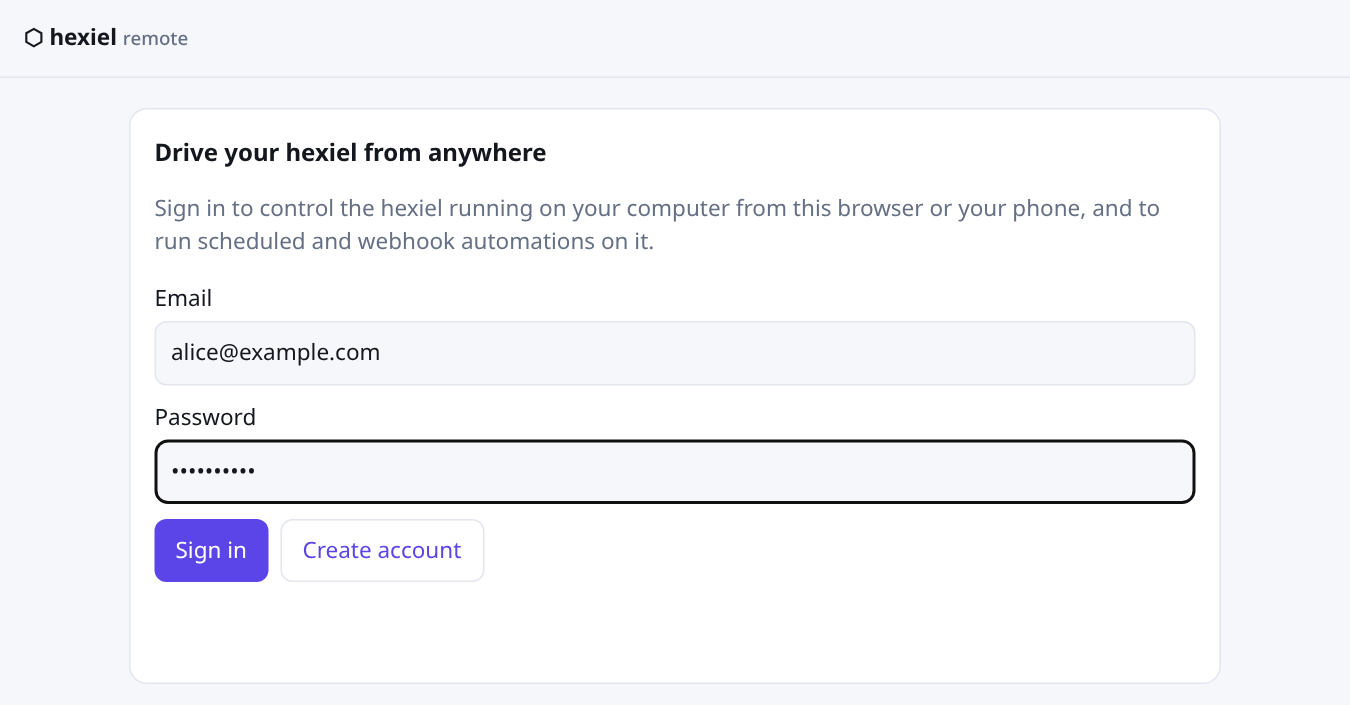
    Open remote.hexiel.tech, enter an email and a password (8 characters or more) and choose Create account. That's all you need to get in — nothing is charged yet, and you can look around before you subscribe.

    The Hexiel Remote sign-in page with email and password fields and Sign in and Create account buttons
    The account page. Sign in later with the same email and password.
  2. 2

    Start your free trial

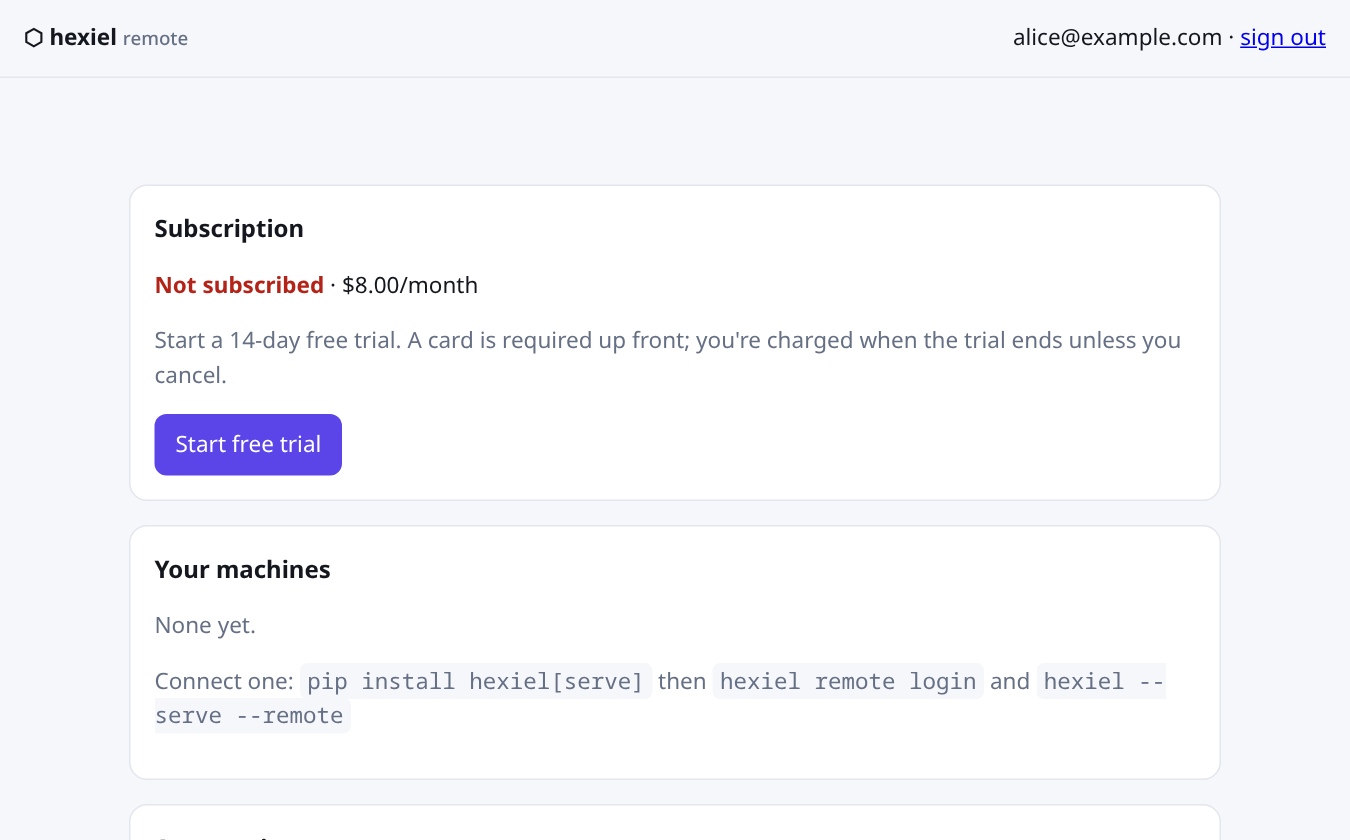
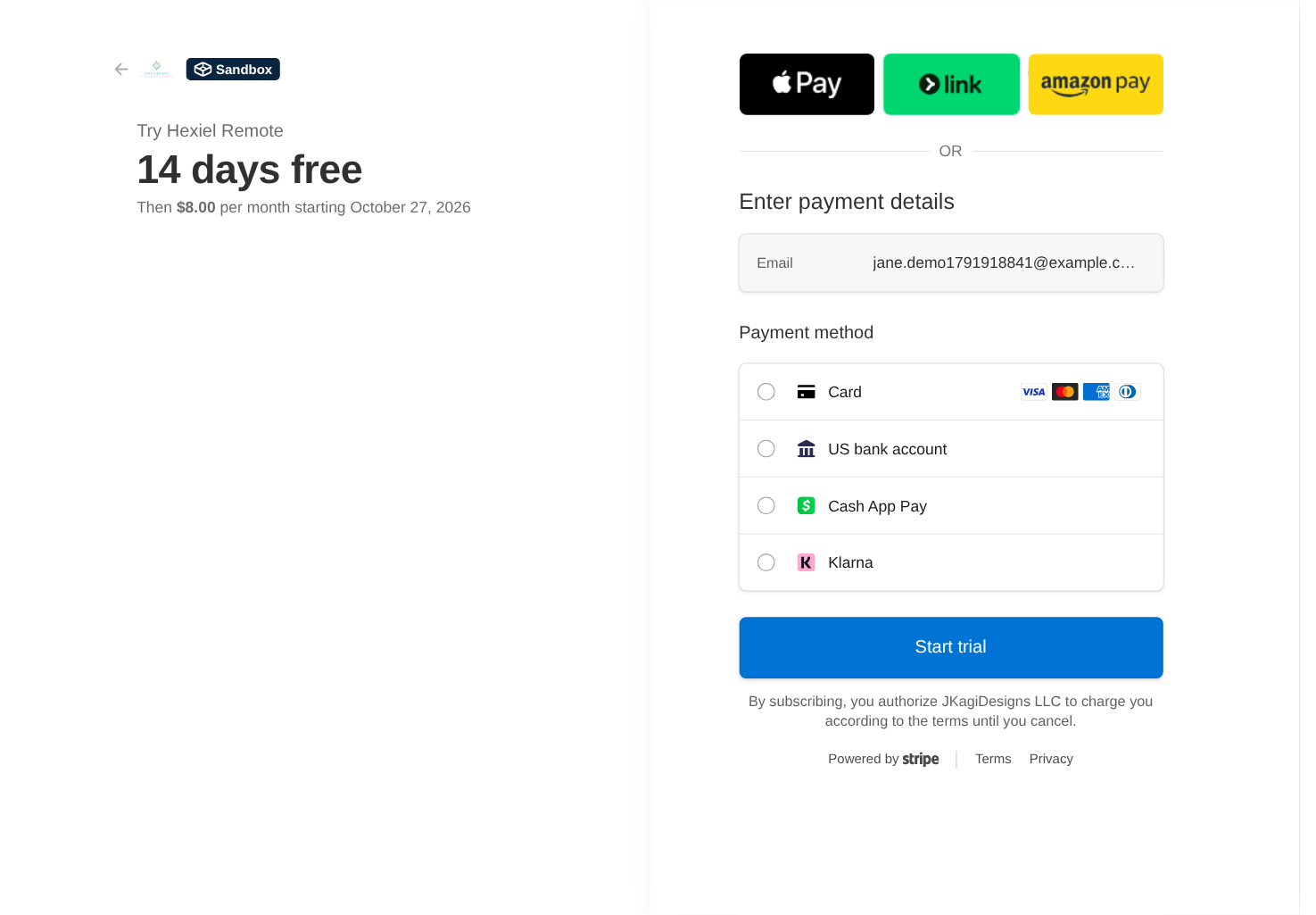
    Your account page shows your subscription. Choose Start free trial: you'll go to Stripe's secure checkout, where you enter a card. The trial lasts 14 days; if you don't cancel, you're billed $8/month when it ends. We never see your card number — Stripe handles it.

    The account page showing Not subscribed, the price of $8 per month and a Start free trial button
    Before subscribing: the price, the trial terms and one button.
    Stripe's secure checkout showing Try Hexiel Remote, 14 days free, then $8.00 per month, with a card form
    Stripe's secure checkout, shown here in test mode: 14 days free, then $8.00 a month.

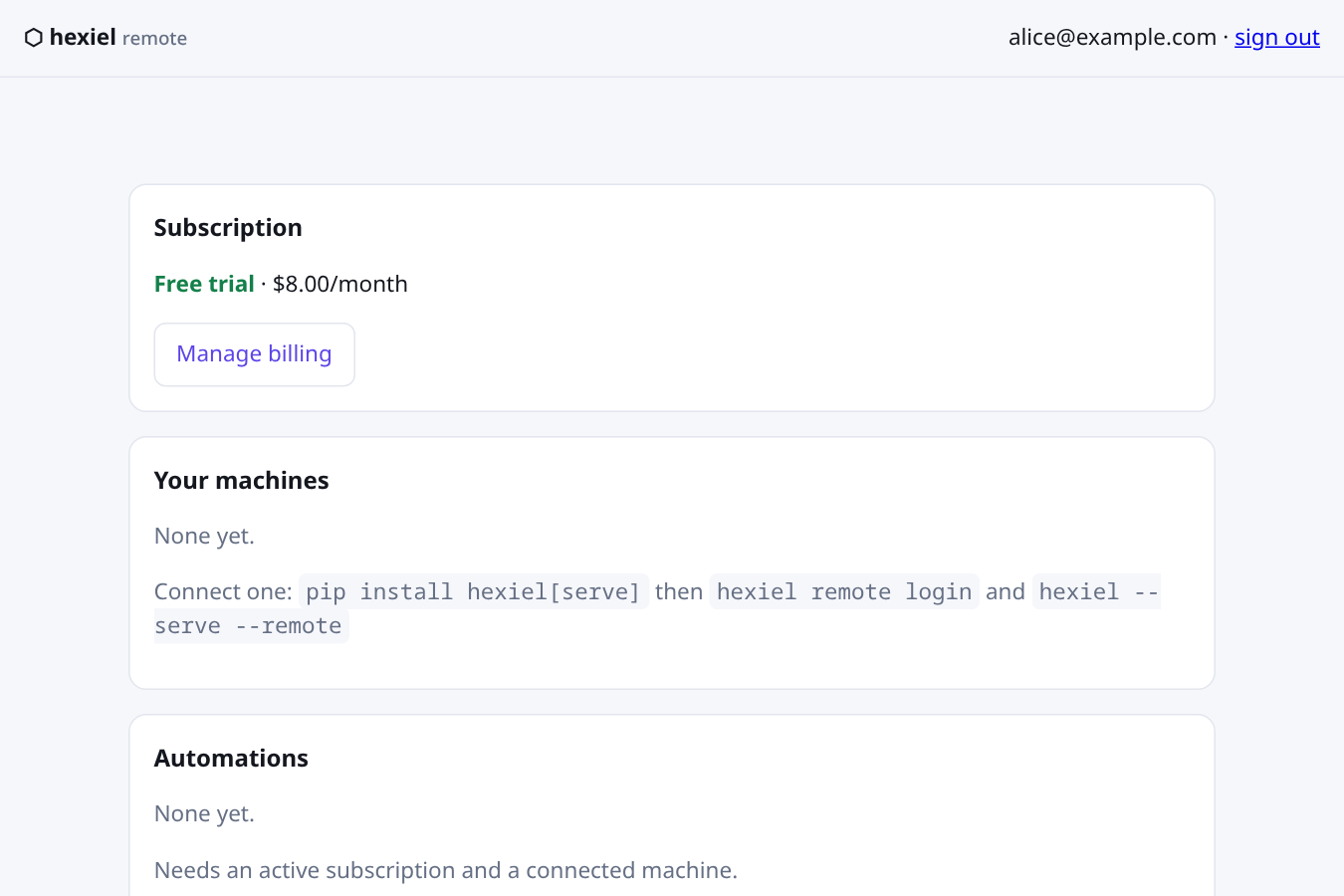
    Once checkout completes you're back on the account page, and the status changes to Free trial. Manage billing opens Stripe's customer portal, where you manage your subscription — update your card, or cancel.

  3. 3

    Connect your computer

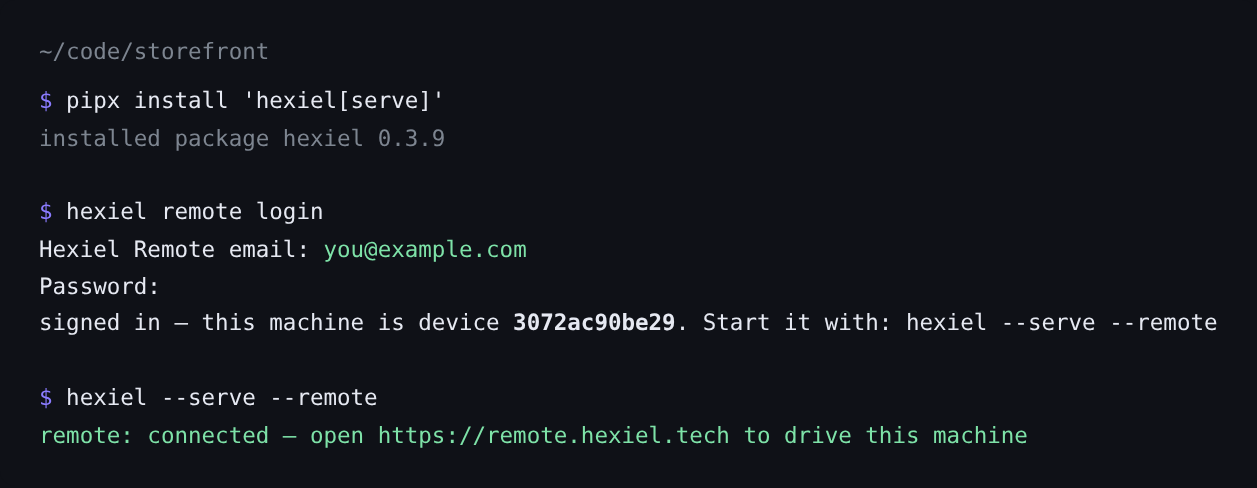
    With a trial or subscription active, your account page shows exactly what to run. On the computer where your code lives, install hexiel, then sign in once with hexiel remote login. When it asks whether to keep the machine connected in the background, say yes: that's what makes it show as online and lets automations run whenever the computer is on. (Prefer to run it yourself? hexiel --serve --remote does the same while it runs. hexiel remote status tells you whether the relay sees your machine.)

    The account page showing Free trial status and the commands to connect a machine
    An active trial. The "Your machines" card lists the commands to connect one.
    Terminal showing pipx install, hexiel remote login, and hexiel --serve --remote with a connected message
    On your computer. The password is typed hidden; hexiel stores a revocable token, not your password.
    • Outbound only. Your computer dials out to the relay. Nothing on your network is opened or forwarded.
    • Local by default. Without --remote, hexiel's browser UI stays on your own machine.
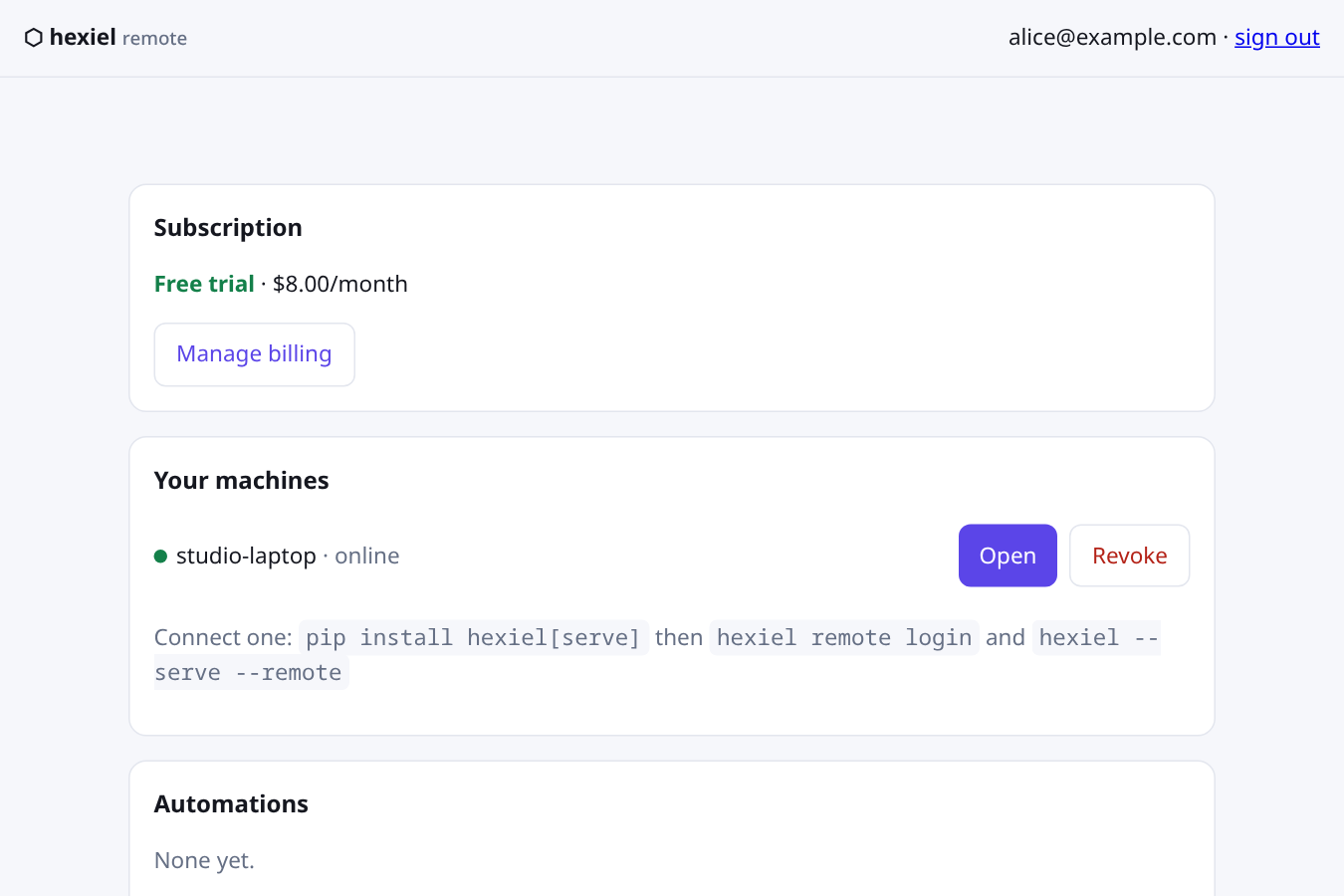
    • Back on the account page, your machine appears with a green dot as soon as it connects:
    The account page showing a machine named studio-laptop online with Open and Revoke buttons
    Your machine, online. Open starts a session; Revoke disconnects it for good.
  4. 4

    Code remotely

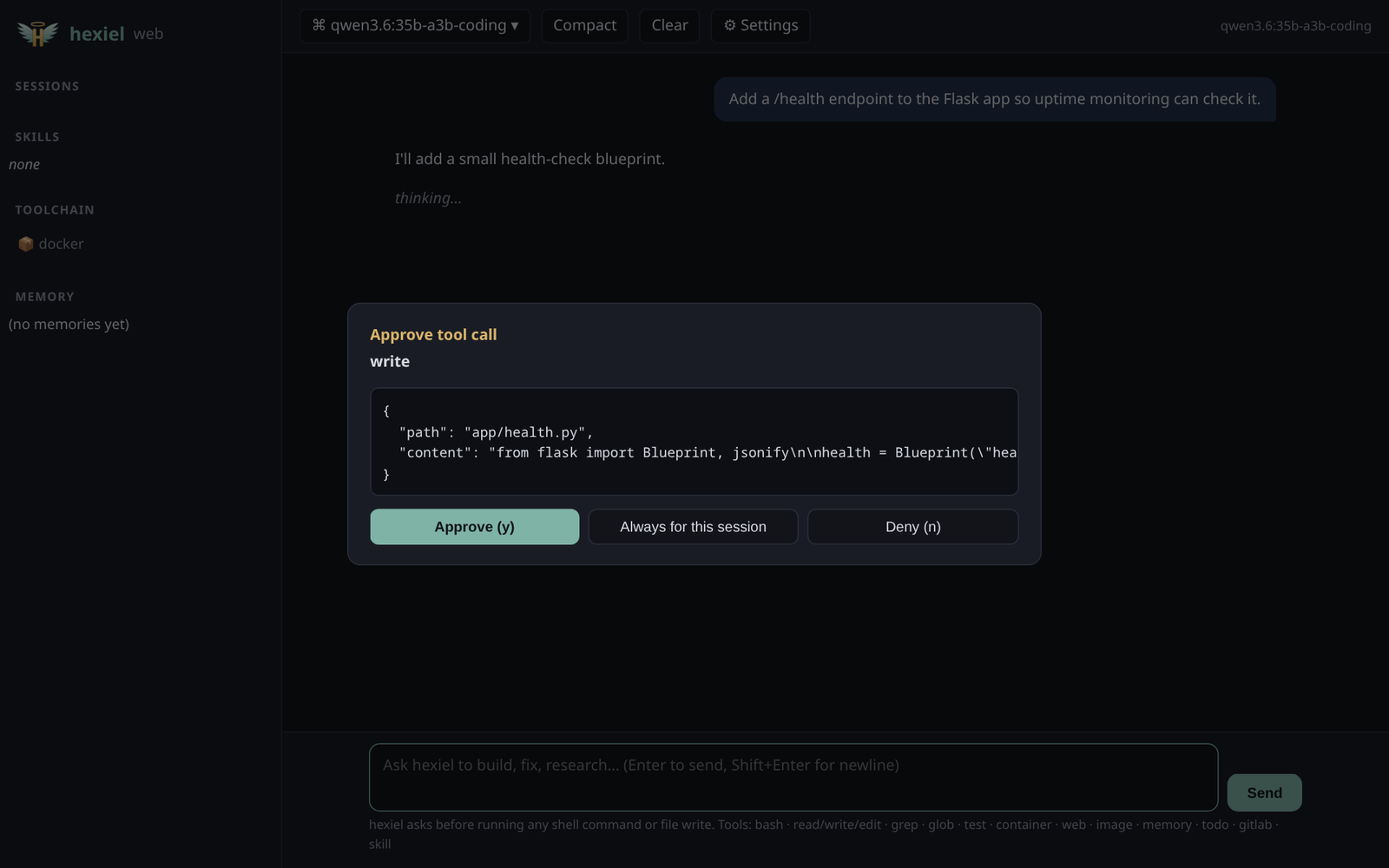
    Choose Open and you're in hexiel's normal web UI — but running on your computer, against your project. Ask for a change and hexiel works exactly as it does at your desk. Anything that edits files or runs a command still asks first, and the approval appears in your browser:

    hexiel's web UI showing an Approve tool call dialog for writing app/health.py with Approve, Always for this session and Deny buttons
    Approve, approve for the session, or deny — the same safety checks as locally.
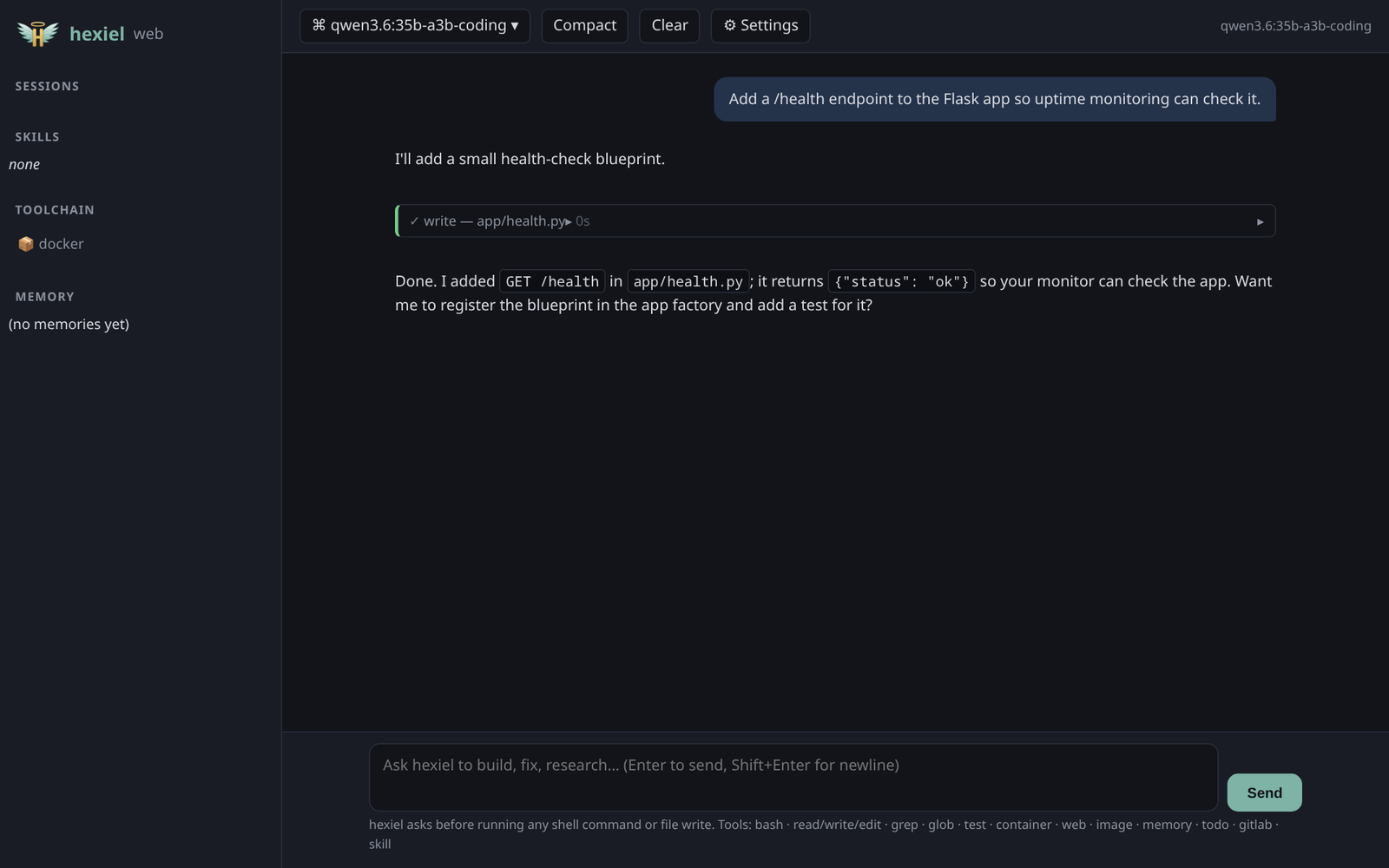
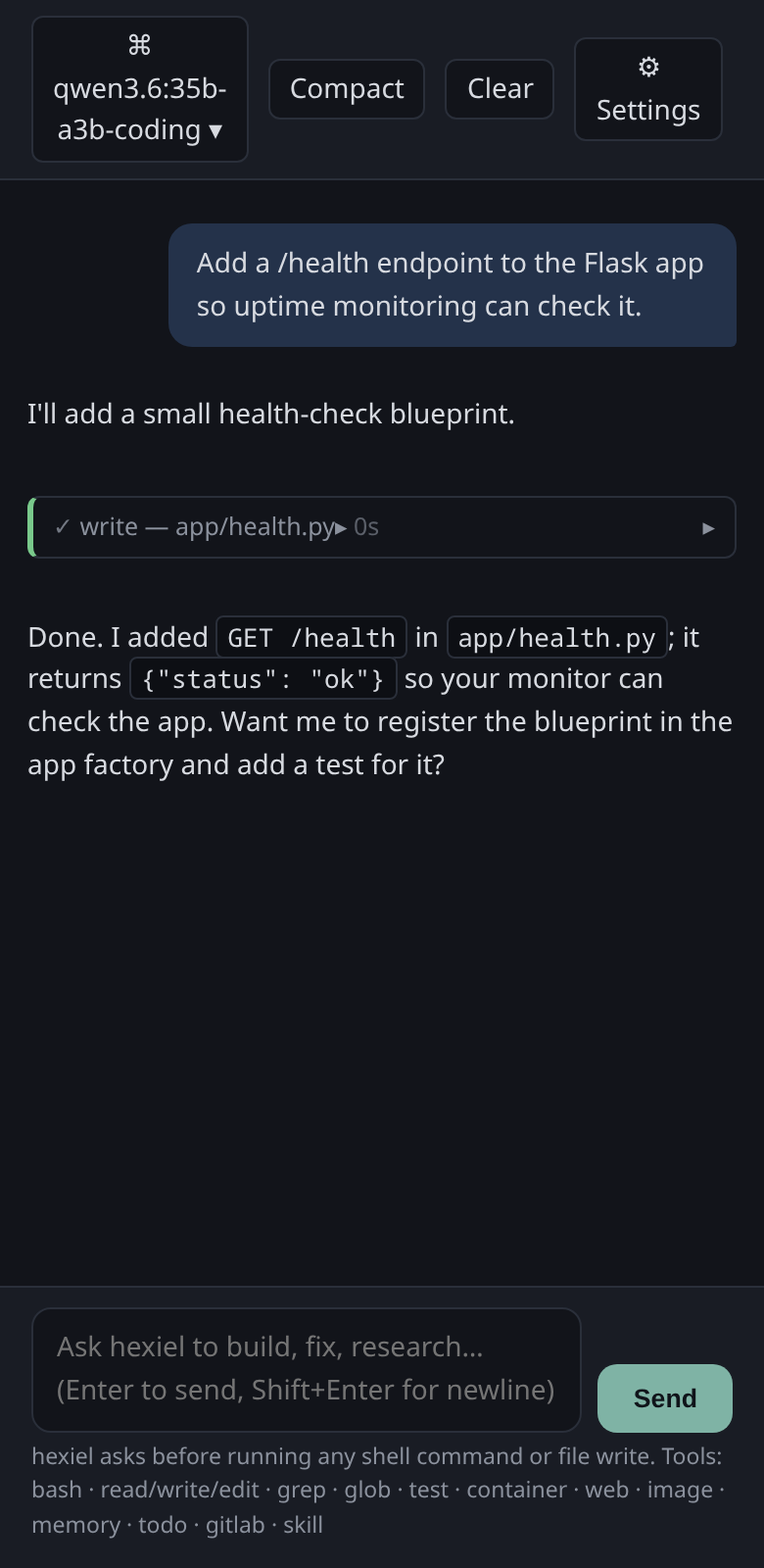
    hexiel's web UI after the change: a write tool card for app/health.py and a message saying the health endpoint was added
    Done. The file was written on your computer — nothing was uploaded anywhere.
    The same hexiel session on a phone-sized screen
    The same session on your phone.

    Works from anywhere

    • Any modern browser, on any device — sign in and tap Open.
    • Paste a screenshot straight into the prompt; it's attached just like at your desk.
    • Your session lives on your computer. Close the tab, come back later (even from another device), and the conversation is still there.
    • If your computer sleeps or loses its connection, it reconnects by itself.
    • Your files and model keys stay on your computer. Traffic passes through our relay over HTTPS, but isn't end-to-end encrypted.
  5. 5

    Put it to work while you're away

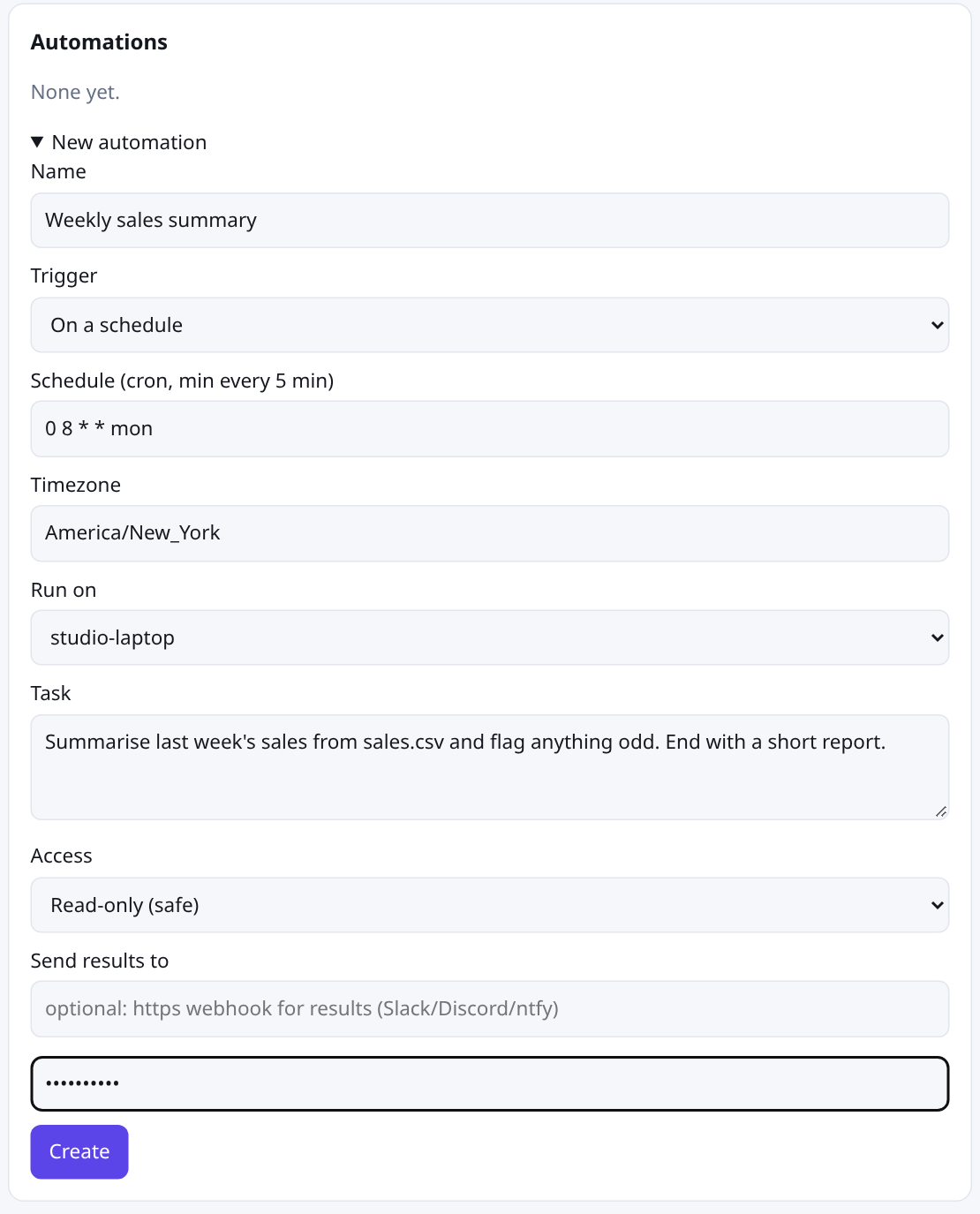
    Automations start a run on your machine on a schedule, or when something calls a webhook URL — a CI job, a form, a monitor. Create one on the account page; you'll confirm with your password, because automations run on your computer.

    The New automation form with name, schedule, timezone, machine, task, access level and results webhook fields
    "Every Monday at 8am, summarise last week's sales." Pick the machine, write the task, choose the access level.
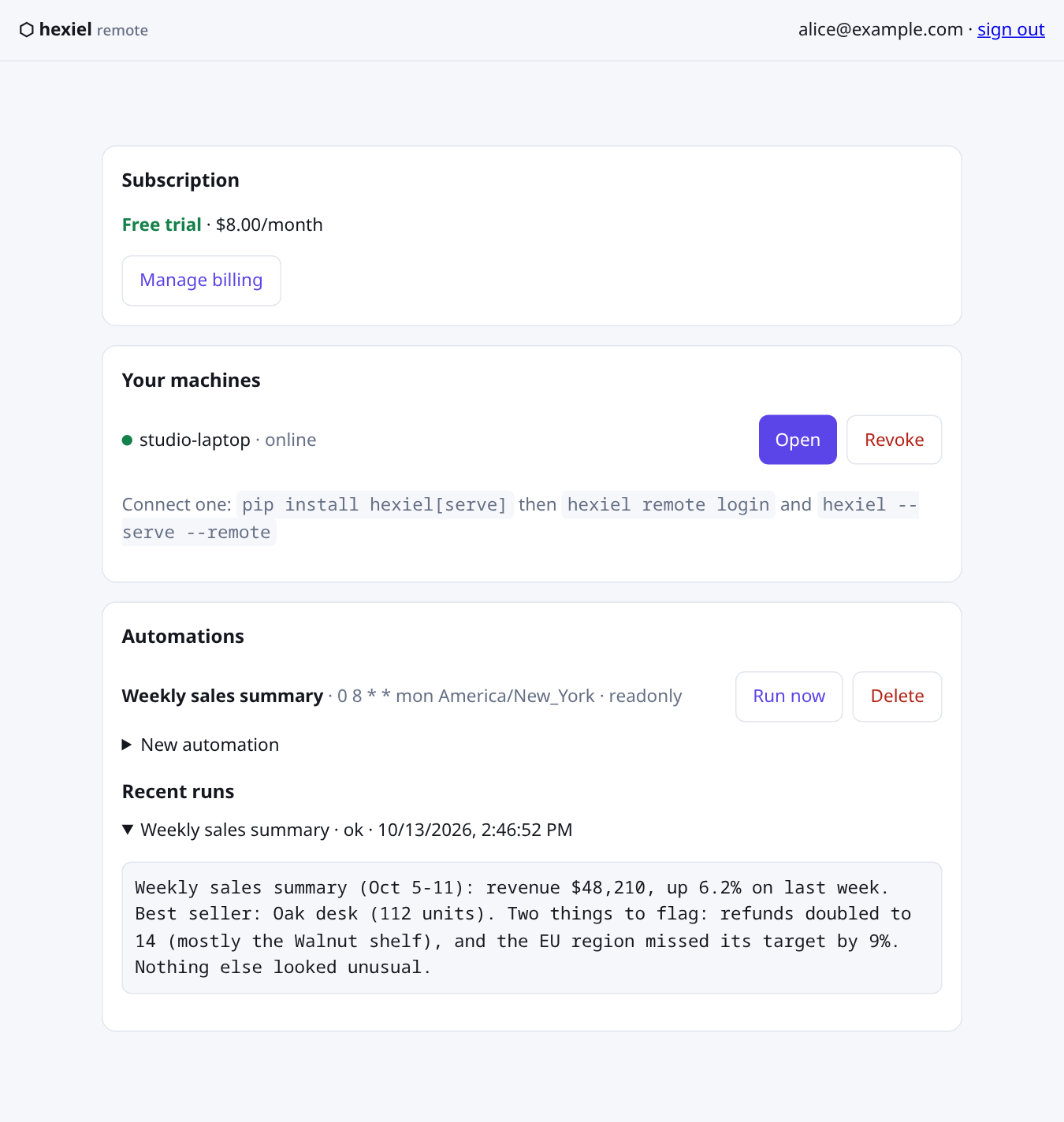
    The account page showing the Weekly sales summary automation and its latest run result with a short sales report
    Results land on your account page — and optionally in Slack or Discord (or any service that accepts a JSON webhook) through a URL you provide.
    • Read-only by default. A run can read, search and research, but can't change files or run commands unless you opt a schedule into full access.
    • Webhooks are always read-only. Whatever the caller sends is handed to the model as untrusted data, never as instructions.
    • Machine asleep when a schedule fires? It runs once when the machine reconnects.
    • Schedules can run at most every 5 minutes.

Screenshots were taken in a demo account with a demo model so the conversation reads cleanly. The interface is the real one.

Safe by design

Your account, your machines

Every connection needs your sign-in and an active subscription. Each computer gets its own token — revoke one from the account page and it's cut off immediately. Your subscription is re-checked every few minutes, so a lapsed one closes open sessions.

Same approvals as at your desk

Edits and commands ask before they run, wherever you are. The model API of your machine is never exposed through the tunnel — only hexiel's own web UI is.

Honest about privacy

Your files and model keys never leave your computer. Your prompts and hexiel's replies do pass through our relay over HTTPS so your browser can see them; they aren't end-to-end encrypted.

Free stays free

hexiel itself — terminal UI, local browser UI, local scheduled jobs — is free and open source. Remote is the only paid part, and it's optional.

Troubleshooting

Most problems come down to one of a handful of causes. Start with these three quick checks, then open the section that matches what you're seeing.

Quick checks

  1. Run hexiel --version. You need 0.3.9 or newer (pipx upgrade hexiel).
  2. Run hexiel remote status. It should say signed in as device …. If it says not signed in, run hexiel remote login.
  3. On your account page, your subscription should read Free trial or Active, and your machine should have a green dot.
I can't create an account or sign in
  • "Email already in use" — you already have an account. Choose Sign in instead.
  • Passwords must be 8 characters or more.
  • "Too many attempts — wait a few minutes" — too many sign-in attempts from your network in a short time. Wait about five minutes and try again.
  • "Sign-in service unreachable" — a temporary problem on our side. Try again shortly.
  • Still locked out? Use the contact form below, from the email address you signed up with.
"Start free trial" doesn't work, or my subscription isn't showing
  • After you finish Stripe checkout, the status can take a minute to update. Refresh the account page.
  • "Payment failed" means your card was declined. Open Manage billing and update it.
  • "Already subscribed" means there's an active trial or subscription on this account. Use Manage billing to change it.
  • Make sure you're signed in with the same email you used at checkout.
  • If you were charged but the account page still says Not subscribed after a few minutes, contact us with the email on the receipt.
My computer doesn't show up, or stays offline
  • Signing in only registers the machine. It shows online while a connection is open: either the background service (hexiel remote install, offered at login) or a running hexiel --serve --remote. Run hexiel remote status to see which, and whether the relay sees you.
  • Look at what it printed:
    • remote: connected — it's working. Refresh the account page.
    • remote: no active Hexiel Remote subscription — start or fix your subscription (see above). It reconnects by itself once it's active.
    • remote: device token rejected — run hexiel remote login — this machine was revoked, or its sign-in was removed. Run hexiel remote login again.
    • remote: disconnected (…); retrying in …s — it can't reach remote.hexiel.tech. It keeps retrying with growing pauses. Check your internet connection and firewall.
  • Hexiel Remote connects directly over HTTPS (port 443). Behind an HTTP proxy? Set HTTPS_PROXY (and NO_PROXY if needed) before running hexiel --serve --remote. SOCKS proxies aren't supported.
  • "Device limit reached" — an account can have 10 machines. Revoke ones you no longer use on the account page, then run hexiel remote login again.
  • Using --serve without --remote keeps hexiel local-only — it never connects to the relay.
The Open button is missing, or I see "That machine is offline"
  • Open only appears when the machine is online and your subscription is active.
  • Already in a chat? Type /remote-control in the terminal or the local web UI and that same live chat becomes drivable from here. It asks you to sign in (or sign up) first if needed, and /remote-control off hands the machine back to the background service.
  • "That machine is offline" — run hexiel remote status on it. If the background service isn't running, hexiel remote install starts it (or run hexiel --serve --remote), then try again.
  • "The machine did not answer in time" — the computer is asleep, busy, or lost its connection. Wake it up and retry; it reconnects by itself.
  • If the page opens but nothing updates, reload the tab. VPNs, browser extensions and corporate networks that block WebSocket connections can break the live view.
Pasting images doesn't work
  • In the browser, just paste (Ctrl+V) into the prompt. Through Remote, images up to 8 MB are supported.
  • In the terminal, pasting an image needs wl-clipboard or xclip on Linux, or pngpaste on macOS. Windows terminals can't paste images yet; type the file's path instead.
My automation didn't run, or did less than I expected
  • The machine must be online. A schedule that fires while it's offline is queued and runs once when it reconnects (you'll see "queued" next to it). A webhook that arrives while it's offline isn't run.
  • Schedules can run at most every 5 minutes, in the timezone you picked.
  • Read-only runs can read, search and research, but can't change files or run commands. That's deliberate. For schedules, you can choose Full access when you create them; webhooks are always read-only.
  • Webhooks: the URL is shown once, when you create it. If you lost it, delete the automation and create it again. Calling a webhook more than once every 10 seconds returns 429 too frequent.
  • Open Recent runs on the account page to see what the run actually returned.
  • No runs at all can mean the subscription lapsed. Check the status at the top of the page.
Billing: cancel, change card, receipts
  • Manage billing on your account page opens Stripe's customer portal: update your card, cancel, and see invoices.
  • Cancel before the trial ends and you won't be charged.
  • Invoices and receipts are available from Manage billing.
Something else, or none of this helped

Send us a message below. The more detail the better — see what to include.

Questions

What does it cost?

$8/month after a 14-day free trial. A card is taken at checkout and billed when the trial ends unless you cancel. Manage or cancel it from Manage billing on your account page.

Does my code get uploaded?

No. Your project stays on your computer and hexiel runs there. The relay only carries the conversation between your browser and your machine.

Do I need to open a port or set up a VPN?

No. Your computer connects out to the relay, like a browser tab would. Nothing on your router or firewall changes.

Can I use my own local model?

Yes — Remote doesn't touch your model setup. Whatever hexiel uses at your desk (Ollama, a cloud API) is what it uses remotely.

What if my computer is off?

The machine shows as offline and can't be opened. Scheduled automations that were due while it was offline run once when it reconnects.

How do I disconnect a computer?

Choose Revoke next to it on your account page. It's disconnected straight away and its token stops working.

Which hexiel version do I need?

0.3.9 or newer: pipx upgrade hexiel, or /update inside hexiel.

Contact support

Still stuck? Tell us what's happening and we'll reply by email. Spam is filtered, so real messages get through.

We only use your details to answer you.

Take your hexiel with you.