Run your local model for almost everything, and spend cloud tokens only on the part that needs
real brains: deciding what to do. For a big task, hexiel asks a cloud model for a plan of small,
self-contained steps, then your local model carries them out one at a time — each in a fresh, small context,
each followed by a check.
One short call to the planner. Everything else — reading files, writing code, fixing tests — runs on your own model.
Better local results
Small models drift as their context grows. Every step starts clean, with only what it needs, so they stay sharp.
You stay in control
You approve the plan first. Edits and commands still ask as usual. Ctrl+C stops it, and a stopped plan can resume.
How it works
From your request to a finished change, in five stages. The planner model is only used in stage 3.
1
Size up the request
When you send a request, hexiel first decides how big it is. Plain rules handle the obvious cases — a long
request, a numbered list of steps, words like refactor, migrate or across, or several
file names point to "large"; a quick question or a one-line fix points to "small". Only when it's a toss-up does your
worker model weigh in, with one short call. Small requests just run normally.
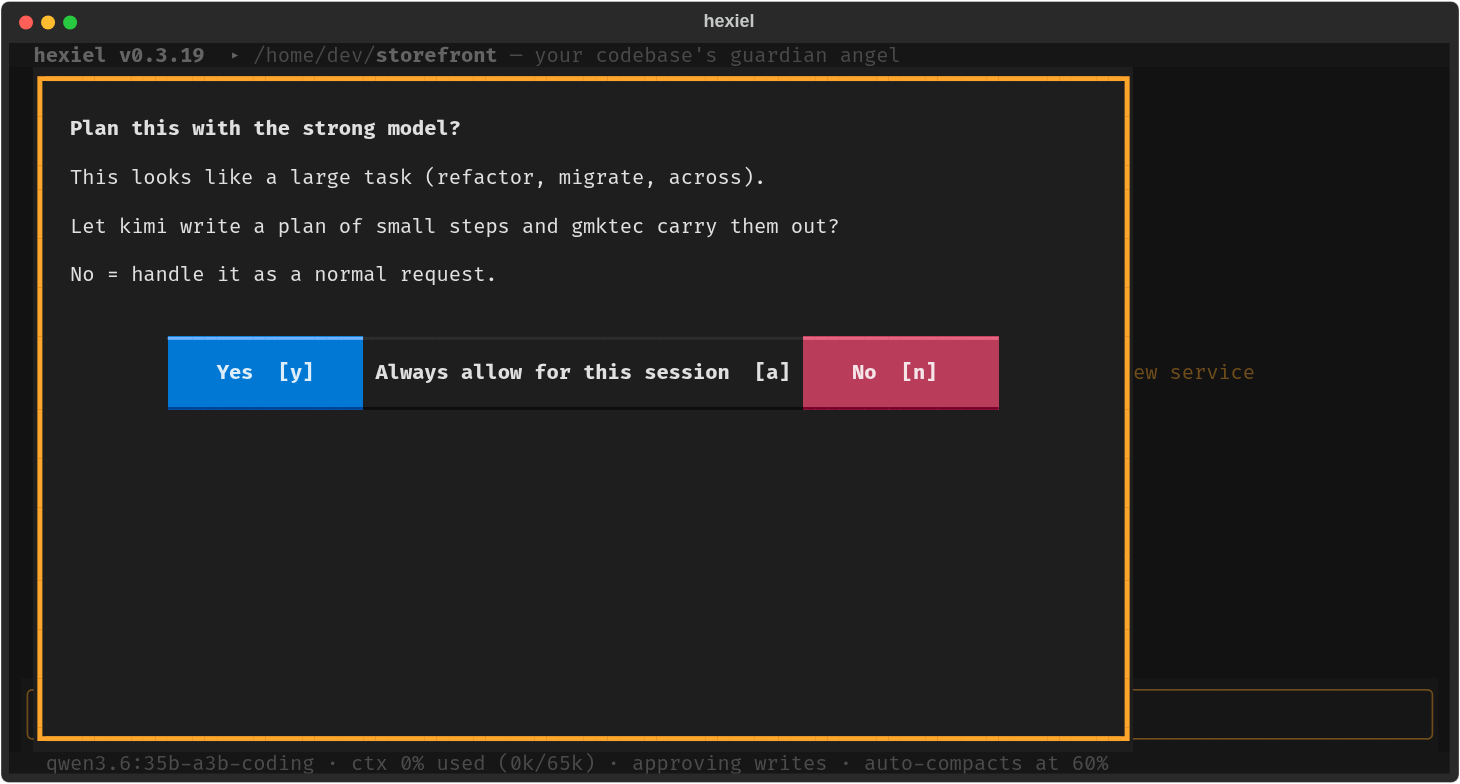
If the request looks large and Big-task check is set to ask, you get this prompt. Choose
No and it's handled as a normal request. You can also skip the check for one request by starting it with
/solo, or force delegation with /delegate.
The offer: which model will plan, which will work, and a plain "No" that falls back to a normal run.
2
Gather context locally
The cloud model never explores your repository. Instead a read-only helper on your worker model does the
legwork — a map of the project, the files that matter with short snippets and line numbers, the project's conventions,
and the commands that build and test it — capped at about a dozen tool calls. That briefing is what the planner sees.
3
The planner writes the plan
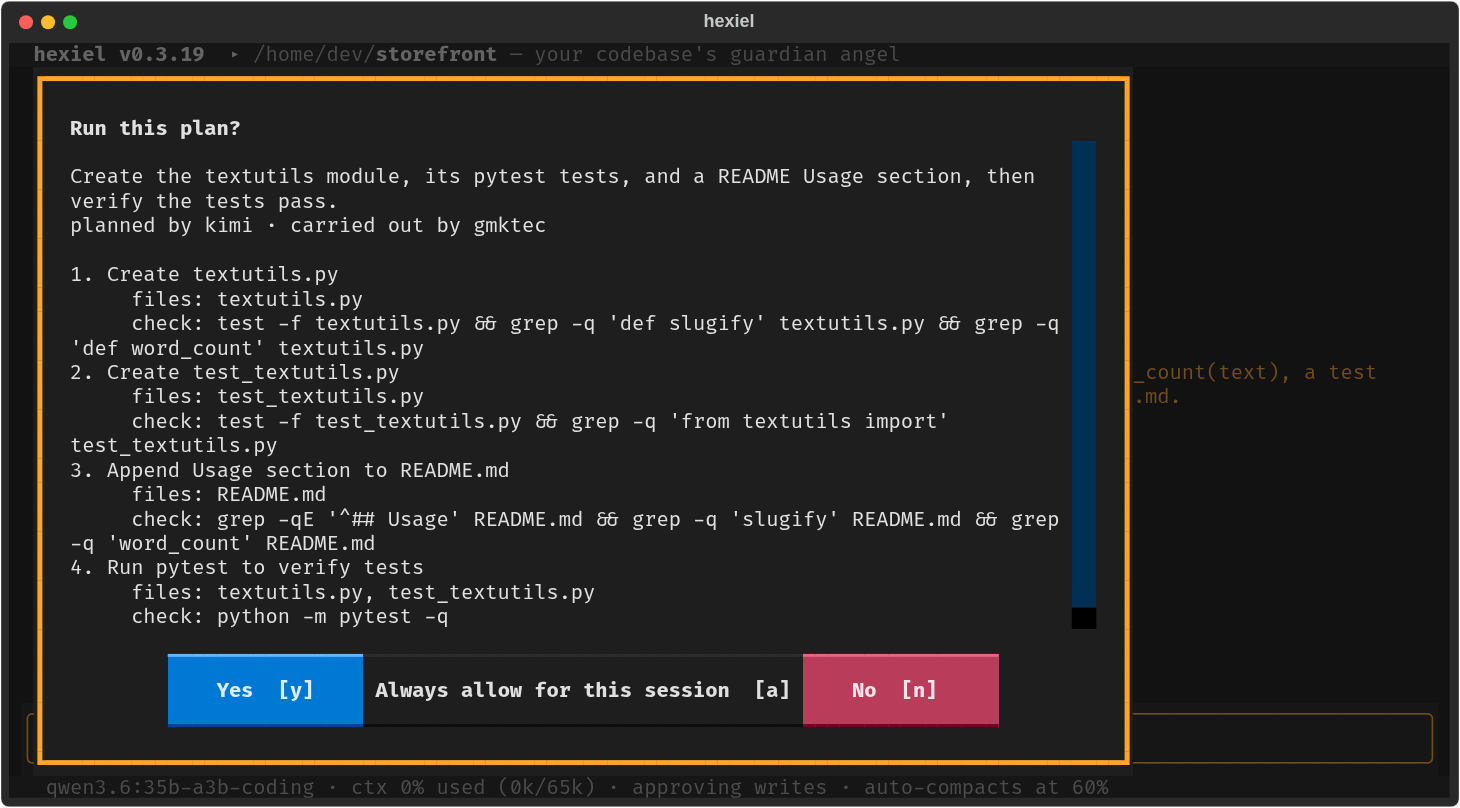
One call to the planner model, with your request and the briefing. It answers with a short list of
steps. Every step has a goal that names exactly what to change and where, the files involved, anything that must not
change, and a check: a single command (a test run, a build, a grep) that succeeds when the step is done.
hexiel validates the plan — task count, dependencies in order, no empty steps — and asks once more if the model got it wrong.
The plan, before anything changes. Always allow for this session skips this dialog for the rest of the session.
If the planner can't be reached (no key, no network, a usage limit), hexiel tells you and lets your worker model write
the plan instead, so a delegated run never just dies.
4
The worker does each step
Each step runs as its own short session on your worker model. It sees the overall goal, a one-line
summary of the steps already finished, and that step's instructions — nothing else — so its context stays small
instead of the whole conversation. When the step is done, hexiel runs its check:
Pass — on to the next step.
Fail — the worker is shown the failure and fixes it, up to Step retries times (default 2).
Still failing — that one step is handed to the planner model, once. If it can't fix it either,
the run stops and tells you which step and why.
You can always see which model is working: the model name at the bottom left of the screen changes as the
work moves — for example qwen3.6:35b-a3b-coding · step 2/4 while the worker runs a step,
claude-sonnet-5-5 · planning while the planner writes the plan, and the planner's name again
(marked escalated) if a stuck step is handed up.
5
A summary, and a plan you can resume
At the end hexiel adds a summary to the conversation, written by the program rather than a model, so it can't
overclaim: which steps finished, which failed, and which files changed. The plan is saved under
.hexiel/plans/ and its progress is mirrored in .hexiel/todo.md. If you press Ctrl+C or a step
fails, /delegate resume picks up at the first unfinished step.
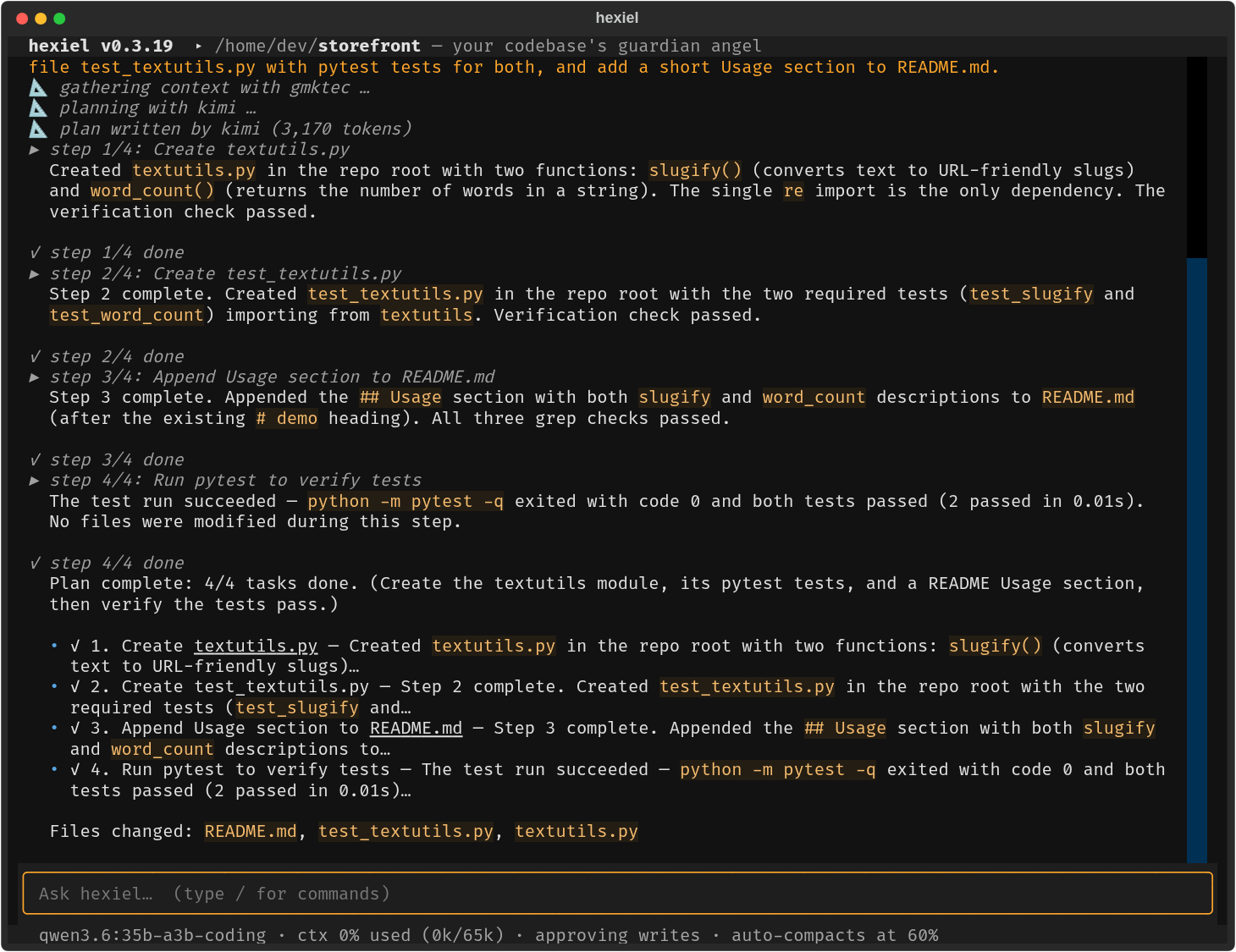
A finished run: four steps, each with its report, then the summary. This one used about 3,200 planner tokens and took about four minutes.
A second pair of eyes
A smaller model is fast and free but misses things. Two features let the strong model catch them
without doing the work: a review of the finished change, and advice when the working model gets stuck.
🔎 Review after the run
Once every step has passed its check, the planner model reads the combined diff, the original request
and the plan, and looks for real defects: requirements that were missed, bugs, wrong edge cases, files that disagree with
each other. Style opinions are ignored. If it finds problems, each becomes an extra fix step, carried out by the worker and
re-checked — one round, so the cost stays predictable. The summary says what the review found. It costs one call with the diff
going in and a short answer coming out. Setting: delegate_review (auto reviews whenever the planner is a
different model from the worker).
🧭 Advice when it's stuck
The working model has a consult tool to ask the planner model a specific question — "why does this keep failing?",
"which of these two designs?" — and hexiel also asks for it automatically when the model is going in circles: three failing tool
calls in a row, or the same call three times. The planner sees your request, the last few steps and the question, and answers in
a few hundred words that the working model reads before its next step. At most three per request; the status line shows the
advising model while it works. Setting: consult_mode (auto, tool or off).
When the local model struggles, the cloud model takes over
You don't have to notice that the local model is stuck. hexiel keeps a struggle score for each request:
a failed tool call, a search that finds nothing, the same call repeated, a very long run of steps — and, counting most,
you correcting it ("no, it's on the macmini", "stop arguing", "I told you…"). A moderate score gets
advice from the planner model. If things keep going badly, the planner model becomes the working model for a short
burst — 8 steps — and then the work goes back to the local one. The status line at the bottom shows the switch
(claude-sonnet-5-5 · escalated) and a note says why. It never switches twice more than twice per request, and a stuck
step inside a delegated plan is handled by the plan's own escalation.
Want the cloud model for one request, no matter what? Start it with /cloud:
/cloud why does the build fail on CI but not locally? Setting: escalate_mode (auto or off).
Both use the planner model you already chose, so there is nothing else to set up. Both are off when no stronger
model is configured, and neither can make a run worse than it was: a failed review or consultation is reported and skipped.
Set it up
You need hexiel 0.3.19 or newer, and two models: one strong (usually a cloud model) and one you're happy
to let do most of the work (usually local). They are ordinary model profiles — anything hexiel can talk to works.
In the app
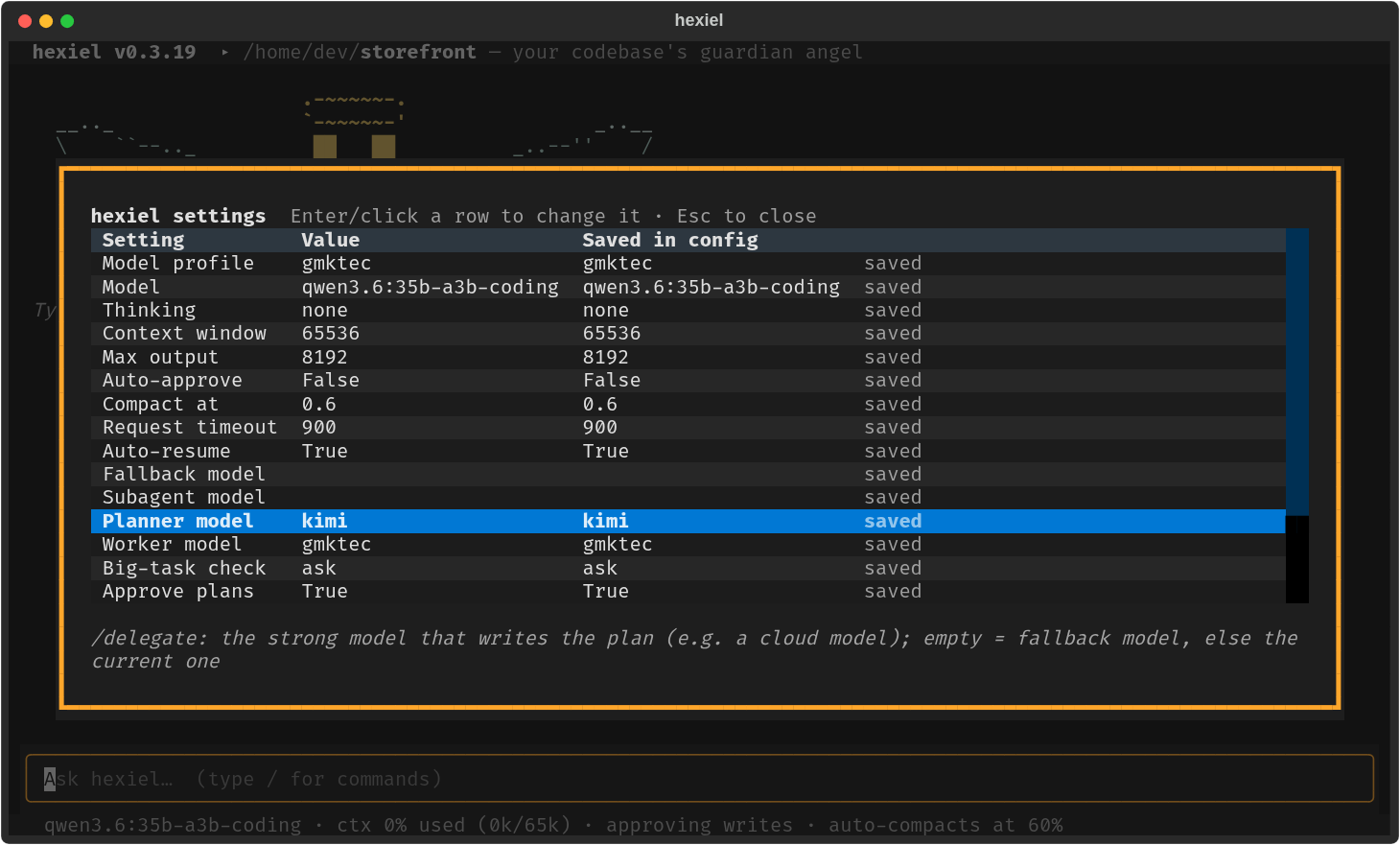
Type /config (terminal) or open the settings panel (browser). Choose a row, pick a value, and choose
whether it applies to this session only or is saved to your config file:
Planner model — writes the plan. Empty means your fallback model, then the current model.
Worker model — does each step and the context gathering. Empty means the current model.
Big-task check — off (default), ask (offer to delegate big requests) or auto.
Approve plans — show the plan and wait for a yes (default on).
Review plans — the planner reviews the finished diff and the worker fixes what it finds (default: auto).
Ask for advice — the planner advises when the working model asks or is stuck (default: auto).
Switch to cloud — the planner takes over for a few steps when the working model keeps struggling or you keep correcting it (default: auto).
Step retries — fix attempts per step before it goes to the planner (default 2).
The settings screen. Delegation is off until you turn on Big-task check — or you can always run /delegate by hand.
Or in config.toml
[settings]
planner_profile = "kimi"       # a cloud model profile that writes the plan
executor_profile = "local"      # your local model profile that does the work
auto_delegate = "ask"          # off | ask | auto
delegate_approval = true       # show the plan and wait for a yes
delegate_retries = 2           # fix attempts per step before escalating it
delegate_review = "auto"       # the planner reviews the finished diff
consult_mode = "auto"          # the planner gives advice when the local model is stuck
escalate_mode = "auto"         # ...and takes over for a few steps when it keeps struggling
The names are profiles from your [models.*] tables — see the
config reference for every setting and for example profiles (Ollama, Ollama cloud models, Anthropic, OpenRouter and more).
Commands
Command
What it does
/delegate <request>
Plan this request with the planner model and carry it out with the worker, whatever its size.
/delegate resume
Continue the most recent plan that isn't finished — after Ctrl+C, a failed step, or a restart.
/solo <request>
Run this request normally, skipping the automatic big-task check.
/plan
A different feature: read-only plan mode, where hexiel investigates and proposes but changes nothing.
Tip: turn on /auto for a delegated run if you don't want to approve every file edit the worker makes.
Approving the plan covers the plan's check commands; the worker's own edits and commands still ask unless auto-approve is on.
Safety, cost and privacy
✓ Nothing changes without a yes
You approve the plan. File edits and shell commands still go through your permission rules and the usual
approvals, and your deny rules also apply to the plan's check commands. Ctrl+C stops between steps or in the
middle of one, and kills a check that's running. If you type something while it works, the message is read before the
next step; during a plan, hexiel pauses after the current step so you can redirect it, and /delegate resume continues.
⛑ Every step is verified
A step isn't "done" because the model says so — its check has to pass. Failures are retried, escalated once,
then reported plainly. The final summary is built from what actually happened.
$ What it costs
One planner call per big request: the request plus the briefing in, a few hundred to a few thousand tokens of plan out.
In our example run that was about 3,200 tokens in total for a four-step change. Retries that escalate a step to the planner add a
little more. hexiel shows the planner's token count after each plan when the provider reports it.
🔒 What the planner sees
Your request and the briefing: file names, short code snippets, project conventions and the build/test commands. If the planner is a
cloud model, that text leaves your machine — the rest of the work never does. To keep everything local, set the planner to a local model too.
Honest limits
The plan is only as good as the briefing. If the local helper misses a key file, the plan can have a gap — the checks and the escalation path are the safety net.
You can approve or decline a plan, but not edit it yet. Decline, and ask for what you want differently.
Steps run one after another, not in parallel.
Sizing a request is a heuristic. Use /delegate to force it and /solo to skip it whenever it guesses wrong.
Questions
Do I need a cloud model?
No. The planner can be any profile, including the same local model that does the work. You still get the plan, the fresh
context per step and the checks; you just don't get a stronger planner.
Which models work?
Any profile hexiel can use: local Ollama, Ollama cloud models, Anthropic, OpenAI-compatible APIs such as OpenRouter or Gemini.
Mixed is the point — for example a cloud model like kimi as the planner and a local qwen as the worker.
What happens if the planner is down or I'm over a usage limit?
hexiel says the planner couldn't be reached and has your worker model write the plan instead. If no valid plan comes out of either,
it tells you and handles the request as a normal one.
How is this different from /plan?
/plan turns on a read-only plan mode: the same model investigates and proposes, and changes nothing until you turn it off.
/delegate actually carries the work out, with a different model doing the planning.
Does it work in the browser UI?
Yes. Type /delegate … in the browser UI, and the planner and worker models appear in its settings panel like in the terminal.
The plan and the offer arrive as approval dialogs.
Where does the plan live?
In .hexiel/plans/ as JSON, with progress mirrored in .hexiel/todo.md in your project. Both are plain files you can read.
The folder is the project's own hexiel folder, so add .hexiel/ to your .gitignore if you don't want it committed.